


My Success With The Cricut Cake With Pic And Tips!
Decorating By kileyscakes Updated 7 Mar 2013 , 1:20am by Goreti


Karen I've been thinking about getting one of those programs as well, but I do remember reading something a while back about one being better than the other, or maybe it was one that didn't work with the cricut? I'm not sure though.
allaboutcake Once you get the hang of the machine, like when to use the shift key and so forth, that will be the easy part. Figuring out which medium to use is the challenge. I agree with Karen about freezing the fondant. I have only done it a few times, but I mostly can roll and cut. I happen to like Fondarific fondant, and I also like to use Cutting Edge's recipe for gumpaste. I'll be anxious to know how you made out cutting the star and heart.
Karen I've been thinking about getting one of those programs as well, but I do remember reading something a while back about one being better than the other, or maybe it was one that didn't work with the ? I'm not sure though.
allaboutcake Once you get the hang of the machine, like when to use the shift key and so forth, that will be the easy part. Figuring out which medium to use is the challenge. I agree with Karen about freezing the fondant. I have only done it a few times, but I mostly can roll and cut. I happen to like Fondarific fondant, and I also like to use Cutting Edge's recipe for gumpaste. I'll be anxious to know how you made out cutting the star and heart.
i'm going to try out one of the programs as have the demo so you can see what it will be like and cut but it puts line through until you buy but it's worth downloading the demo to see what you think of it -i'm testing MTC at moment.
Thanks for the youtube links I've been having a watch - there seems so much info on how to do stuff - loads to learn!
The stars came out much better when you press the base shadow blackout that someone recommended earlier in response to my problem. It only cuts round it once rather than the twice which seemed to squash the inner star! I've given up on freezing - found it went too sticky quickly so i'm rolling, leaving for 5/10 then cutting and is working ok so far. the challenge now is going to be a design I have of my own that I need - an emblem - to see how that is going to cope. What setting do you all normally use - medium or high for pressure?

Hi guys, been reading all of this and now very excited about this machine, however I'm being a little dumb here, if I got this and the make the cut programm, how ans what to I need to transfer the image from the pc to the cutter?
Hi Twomorecats - yes it's exciting isn't it as I've just started playing with it this morning too. Now this is one answer I know - you need a cable - i've used the one I use for my printer that goes from the usb port in your pc or laptop to the back of the . You can see at back of next to the power inlet another point. It plugs into there. When you turn on MTC and press cut within the program it sends it to the to cut HTH

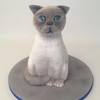
Thanks ,I was reading about others having other machines, etc and thought there is no way I can get OH to let me buy more stuff, but as you say a cable is all that is needed it sounds great, OMG, there are soooo many images I would want to cut, Im doing stuff for local cat and kitten rescue so pussy cats are a must, let alone ben 10 for my 3 yr old, will do a search an see the cheapest price for the software, no more carts at £70 for me!!!
Hi everyone,
Thanks to you all I didn't give up on the CC. I used a 50/50 of homemade fondant and GP rolled it out to 1/16 with icing sugar (you can use corn starch it dries faster) and left it to dry for about 15 mins. I was able to cut out 6 butterflies and remove them from the mat immediately.
The texture of the 50/50 was much stiffer than I thought it should have been but it works best stiffer.
The only problem I have is that the material 'pulls' a bit at the edges. I realised it was a problem for others CC users but is there a solution to this? Or would I have to use the reverse for all cuts?
Also, I used low pressure and low speed for my cuts and it was fine besides the edges. Plus I get to save my mat from being destroyed.
Hi Kimbo
I'm so glad you didn't give up! I also had issues with the fondant pulling on the edges. Now I always start the cuts at least 2 inches in from the edge of the fondant. Also, make sure that there is good contact between the fondant and the mat. To assure this, roll it directly onto the mat. It does help.
Kathy
Ladies, I went at the CC again last night and had more success with it! Thank God =) After spending the money I really had to make it work.
It still tends to give me rough edges and I don't have the patience to clean it off so what I do is flip the image and use the backside of the cut.
But I am going to get the right texture to the 50/50 so I wont have to continuously flip the image.
Any suggestions on how to prevent the rough edges? Am I leaving it too long to dry or not long enough now?
Thanks for all the help I really appreciate it!

I don't think you're letting dry long enough. I roll it thin, put it in a zip lock bag and let it dry over night.
I definitely can't do the overnight thing! That's way too long for me to wait. I live in the Caribbean so the weather is quite dry recently so that helps a lot. I'll leave it to dry a little longer. Thanks so much Tiggy
That's why I ended up getting more mats - it really helps the process go faster.

Sigh! I know. I read that I should get more than one mat but I wasn't able to think about another item to purchase. It's costly for me since I have to ship these things in myself.
I read somewhere that you can use flexible cutting mats. Would you suggest using it?
Well, I bought them ~ but I haven't had time to try them yet. They were cheap, 3 for 4.98 at Walmart. I have 6 regular mats and 2 of the long mats so that keeps me going at the moment. If I get a chance to try them in the next couple of days I will let you know. Several others have had good luck with them!
Well, I bought them ~ but I haven't had time to try them yet. They were cheap, 3 for 4.98 at Walmart. I have 6 regular mats and 2 of the long mats so that keeps me going at the moment. If I get a chance to try them in the next couple of days I will let you know. Several others have had good luck with them!
 Yes, please let me know how that goes for you. I will probably buy a few more mats. How can you tell when the mat is ready to be discarded?
I had the bright idea of rolling out gumpaste and putting it on a cake board with wax paper on it and put it in the freezer...ehhhh....the wax paper would not come off the gumpaste hehe....so dont do that
maybe if greased the wax paper it would work
would maybe parchment paper work better..since its a lil more durable....or try a lil cornstarch or PS... I think grease might make it stickier.
yes thats what I was thinking right after I typed that lol....great minds huh

I did my first proper cricut cake today, pink and girly, it all went quite well. Ionly used fondant and for some reason today they cut out and came off the mat ok.  Mind u they were fairly solid shapes. Anyhow the cake came out well and the client was really pleased with it.
I did my first proper cake today, pink and girly, it all went quite well. Ionly used fondant and for some reason today they cut out and came off the mat ok.
Mind u they were fairly solid shapes. Anyhow the cake came out well and the client was really pleased with it.
Ah brill well done did you post any pics? i've been having a play with mine did a little cake for my friend at weekend who's wedding cake I did and they didn't get to eat any of their top tier so did a little sponge with some swirly hearts and Mr and Mrs lettering on the top in same flavour as their top tier. They came off the mat ok but I think also cos they were fairly solid and not too thin
Micheal's Has the Cricut Cake on sale for 199.99 and the mats and things for 50% off till the 9th. I am going to get mine today Will be testing it out tonight I can't wait!!
THANKS for the tip.
is that in store or online?
It is in the store from what I know you can't buy online at Michael's.
Quote by @%username% on %date%
%body%