


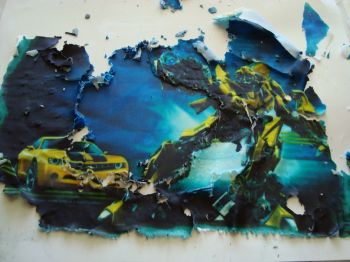
Okay, so I had a transformers bumblebee cake to do and "thought" it would be easier using an edible image, so i bought the image from the bakery that does them since i don't have the printer.
Now everything was going great until i tried getting the image off the frosting sheet. I was running late due to the image problem but i did manage to give him something looking like a transformer.
The customer was pleased with the results granted i only had 15 minutes to put that together.
But my question is How do you get those images off? I live in the Caribbean so would that affect the process?



If you pop it in the freezer it lifts right off the backing 
I usually take the image with the backing still on and go to the edge of my counter top. Start at the top and gently slide from top to bottom (image facing you). Hope that makes sense. The image usually slides right off of the backing. The cake looks great!
If you pop it in the freezer it lifts right off the backing
I tried that and it hardened the sides but the middle just would not lift off, then it started ripping.
I usually take the image with the backing still on and go to the edge of my counter top. Start at the top and gently slide from top to bottom (image facing you). Hope that makes sense. The image usually slides right off of the backing. The cake looks great!
Ya know i didn't think of trying that, maybe next time if i venture near edible images again.
Thanks
You are welcome! Don't ask me how I know.. I had to learn the hard way! 


Depending on the type of icing sheet will determine the problems that you had. My guess is that the icing sheet was thin and the amount of ink that was used for the transformer caused the image to merge to the backing. You were fighting an endless battle. Both were good ideas. I would talk to the bake shop you got it from as they deal with it all the time. The freezer method is great, but no more than 5 seconds. Rolling it on the counter top helps it release, but with the amount of ink and a thin icing sheet coupled with your humidity, I would recommend a differnt brand of icing sheet.

If ti's a luck's brand icing sheet (really the best) then a thin knife under an edge and it will pop off.
All other brands take 5 minutes or so in the freezer and they should pop off.
But that one looks like it came out of the printer a mess.
Actually there is another brand, the Premium brand that peels off immediately without any type of manipulation what so ever.
I think that your final cake looks better than the printed image would have looked. Great save!
I think that your final cake looks better than the printed image would have looked. Great save!
Thanks, giving the amount of time i had.

I think Leah-s hit it on the nail. That EI indeed does look like it came out of the printer way too warm or just not setting on the backing right. Did they use rice paper to print on? Even in a warmer climate, you should not have had the issues like this. Usually keeping the EI in a cooler place when you have high humidity helps.
I just did 3 EI and they transferred just perfect....sorry yours was such a mess. I think your design that you came up with on your own is quite lovely!
I print EI's here at my shop every day. Here are the problems I see with your EI:
1)The inks are really dark, which means there is a TON of ink on that image, making it next to impossible to remove it from the backing.
2)The sheet type you have is especially difficult to remove if you don't do it regularly because of the "tattered" edges.
After quite a few customers calling me with these type EI disasters, I started removing the images for the customers before they even left the store. Depending on the image, I will put it on parchment paper to keep it from re-sticking, or just lay it back on the original backing. I haven't had a customer call with a problem since.
The responses earlier about using the edge of the counter and the fridge to make it remove are both spot on. The fridge works better with heavier inks, i've found, than does the counter edge. However, be very careful not to leave it in the fridge too long (more than 15 minutes at the absolute longest) or it will crack.
Finally, next time you order an image, ask if they use a new style paper that doesn't have the tattered edges, prints to the edge, and removes by just a simple peel, no matter how much ink is on it. We use this paper now for all of our images and it is a dream.
But really, I think your transfornmer turned out just right without the image. I recognized it as bumblebee before I even began reading what went wrong.
You all should check out the premium icing sheets. This would eliminate all the problems you are having
yes icingimages! the premium sheets are the ones I swear by now (i have your system in my store) and they have solved every problem my customers have ever had with the sheets. I still have to let the ones ladden with ink dry a little longer, but overall the premium sheets (especially the ingenious round ones....thanks so much) are FABULOUS!

Ok. Not to hijack, but I'm about to. I've been using Kopy Cake and haven't had a problem. But the shipping is as expensive as the sheets. So I went to your icingimages, and I tried to look for icing sheets, but my printer doesn't come up under the choices. I have an Epson (LOVE IT!!!) and it's a 4 cartidge. Do I choose the Canon 4 cartridge instead? Does it make a difference in the icing sheets themselves????
Thanks!!!!
You all should check out the premium icing sheets. This would eliminate all the problems you are having
We have decided to get one of of the systems for ourselves and didn't know about you guys until this post. I will definitely be ordering one shortly.
I've been dealing with icing images for 3 years now and I can't say enough good things about their customer service (which is really crucial when dealing with ink, printhead problems, etc.)...and the premium quality is by far, the only way to go. Bonus: They are a dealer for SugarVeil!

Depending on the type of icing sheet will determine the problems that you had. My guess is that the icing sheet was thin and the amount of ink that was used for the transformer caused the image to merge to the backing. You were fighting an endless battle. Both were good ideas. I would talk to the bake shop you got it from as they deal with it all the time. The freezer method is great, but no more than 5 seconds. Rolling it on the counter top helps it release, but with the amount of ink and a thin icing sheet coupled with your humidity, I would recommend a differnt brand of icing sheet.
GOOD INFO! Thanks!

Before I bought my own printer I use to order them from a cake shop and they were always easy to peel except for the one time that they got (the store) a defective batch and the image wouldn't peel!! It was very frustrating, but I told her and she inmediatelly replaced them for me....very nice of her! I'm still her faithfull customer for other stuff
Ok, I must say that I absolutely love my customers! They are absolutely the best! I must brag though, I was talking to one of them today and she goes way back with me. I remember being on bed rest during the time I was pregnant with my now 7 year old and I had to run my business from my bed while my dad ran the steps to fill and ship orders! At any rate, I want to answer this post:
Ok. Not to hijack, but I'm about to. I've been using Kopy Cake and haven't had a problem. But the shipping is as expensive as the sheets. So I went to your icingimages, and I tried to look for icing sheets, but my printer doesn't come up under the choices. I have an Epson (LOVE IT!!!) and it's a 4 cartidge. Do I choose the Canon 4 cartridge instead? Does it make a difference in the icing sheets themselves????
Thanks!!!!
You can choose any printer, just dont order the ink since it wont be compatable. Then it will bring up the icing sheets. Call if you have questions.
Quote by @%username% on %date%
%body%